
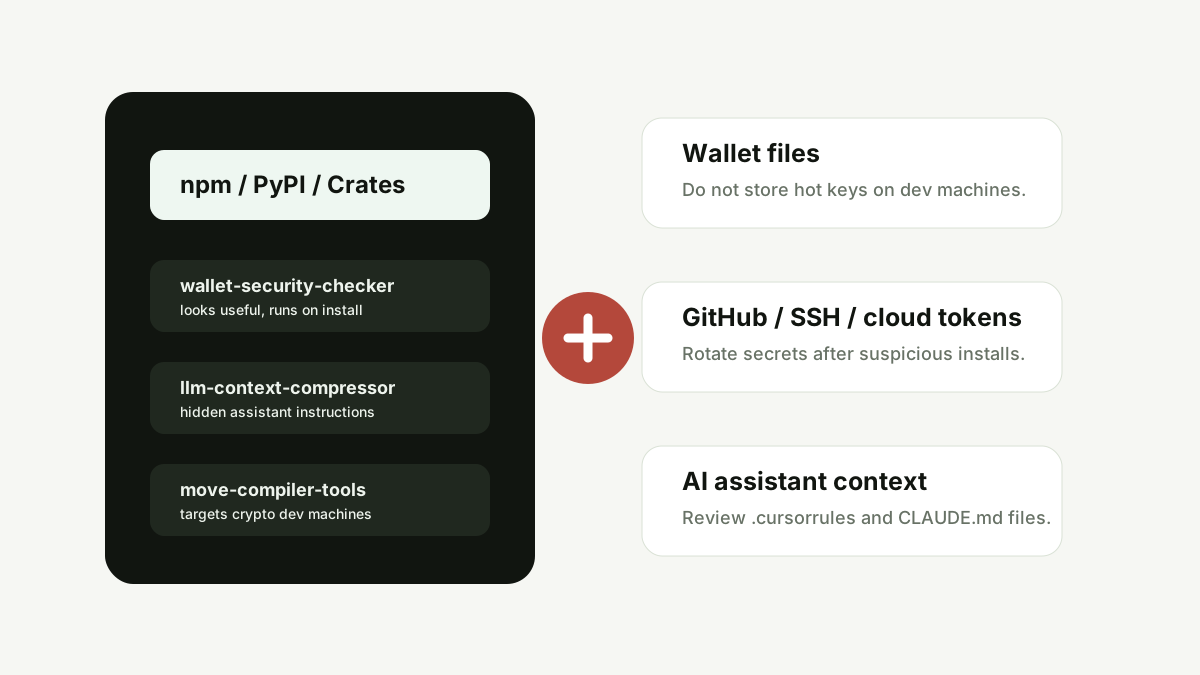
TLDR summary
TrapDoor is a reported supply-chain malware campaign targeting crypto, DeFi, AI and security developers through malicious packages published across npm, PyPI and Crates.io. The practical risk is not only the package itself. It is the developer machine: wallet files, browser extension data, GitHub tokens, SSH keys, cloud credentials and AI assistant configuration files can all become part of the attack surface.
Key takeaways
- Crypto security is no longer only about exchange passwords and seed phrases.
- Developer machines can hold wallet data, production access and cloud secrets in one place.
- Malicious packages may look like boring utilities, security scanners or AI workflow helpers.
- AI coding tools add a new layer of risk when project instruction files can be poisoned.
- After a suspicious install, rotating secrets matters more than simply deleting the package.
What happened?
Security reporting around TrapDoor describes a coordinated campaign of more than 34 malicious packages and hundreds of related versions across major open-source registries. The packages were designed to look useful to crypto, DeFi, AI and security developers, while attempting to collect sensitive files and credentials from developer environments.
CoinDesk reported that the campaign targeted Solana, Sui and Aptos wallet data and used packages disguised as developer helpers, wallet tools, Solidity utilities, AI prompt packages and Move build helpers. Cointelegraph reported that Socket linked the campaign to malicious packages across npm, PyPI and Crates.io, with targets including crypto wallets, SSH keys, cloud credentials, GitHub tokens, browser extension data and API keys.
Why this matters for crypto SEO and users
Most retail crypto safety content focuses on fake exchanges, wallet drainers and phishing links. Those still matter. But TrapDoor shows another high-intent search area: supply-chain attacks against the people and teams building crypto tools. If a crypto developer's laptop is compromised, users may later face fake releases, poisoned frontends, leaked keys, compromised infrastructure or malicious wallet prompts.
How malicious packages create trust
The strongest lures often look ordinary. Package names may sound like security helpers, wallet scanners, build tools, model routing utilities or setup scripts. A developer rushing through a build may install them because the name feels useful and the package appears in a familiar registry.
| Risk signal | Why it matters | Safer action |
|---|---|---|
| New package with security-themed name | Attackers know crypto developers search for audits, scanners and wallet helpers. | Check maintainer history, repository, download pattern and source code before install. |
| Postinstall or import-time execution | Code can run immediately before the user notices. | Avoid running unknown packages on machines with wallets or production access. |
| Requests for environment or credential files | Wallets, cloud keys and GitHub tokens may sit in predictable folders. | Use isolated machines and secret scanning for developer workstations. |
| AI assistant instruction files | Project context files can influence future coding sessions. | Review `.cursorrules`, `CLAUDE.md` and similar files before trusting a repo. |
The AI assistant angle
The most interesting part of TrapDoor is not just package theft. Reports describe hidden instructions in files used by AI coding tools. That matters because AI assistants increasingly read project context before suggesting or executing workflows. If that context is manipulated, a future “security scan” or “setup task” can become a secret-exfiltration step.
Response checklist after a suspicious package install
- Stop using the affected environment for wallet, exchange or production work.
- Preserve package names, versions, timestamps and install logs for review.
- Remove the suspicious package, but do not assume deletion is enough.
- Rotate GitHub tokens, npm/PyPI credentials, SSH keys, cloud keys and CI/CD secrets.
- Check browser wallets, local wallet files and hardware-wallet companion software.
- Review project files such as `.cursorrules`, `CLAUDE.md`, shell hooks, cron jobs and startup services.
- Rebuild from a trusted machine if the environment handled production access.
What non-developers can learn
If you are not a developer, the lesson is still useful: official-looking distribution channels are not guarantees. App stores, browser extensions, package registries, search ads and GitHub repositories all need verification. The same mindset that helps avoid fake exchanges also helps avoid poisoned tools.
Sources and further reading
- CoinDesk: Solana, Sui and Aptos wallet data targeted in TrapDoor package attack
- Cointelegraph: TrapDoor malware targets crypto dev tools
- CryptoTimes: TrapDoor malware hits npm, PyPI and Crates.io
FAQ
What is TrapDoor malware?
TrapDoor is a reported software supply-chain campaign that used malicious developer packages across npm, PyPI and Crates.io to target crypto, DeFi, AI and security developers.
Why does TrapDoor matter for crypto users?
Crypto teams may store wallet files, GitHub tokens, SSH keys, cloud credentials and browser wallet data on development machines. Compromising those machines can create downstream risk for products, users and infrastructure.
What should a developer do after installing a suspicious package?
Rotate secrets, review wallet exposure, check AI assistant context files and rebuild from a trusted environment if the machine had production access.
Conclusion
TrapDoor is a warning about where crypto security is going. The next risky crypto interaction may not begin with a fake trading site. It may begin with a package install, a poisoned repo or a hidden instruction inside an AI coding workflow. Treat developer tools as part of wallet security.